Using Rabbit subscribers
Subscribers (or consumers) subscribe to queues, and only one could subscribes to one queue at time, it would be wrong one subscriber could be subscribed to many queues at same time.
Subscribers are considered another client for ESB ecosystem, so It could be used in different ways, It could be right your application can host many subscribers, but not for scaling purpose, but for other kinds of needs, one use-case could be your application needs to read messages for many queues, because It's a application requirement.
If you need to scale your application, the only thing to do is scaling your application, scaling application which hosts your subscribers, automatically It scales the throughput of consuming messages.
Subscribers overview
In the following image, It's shown how work subscribers.
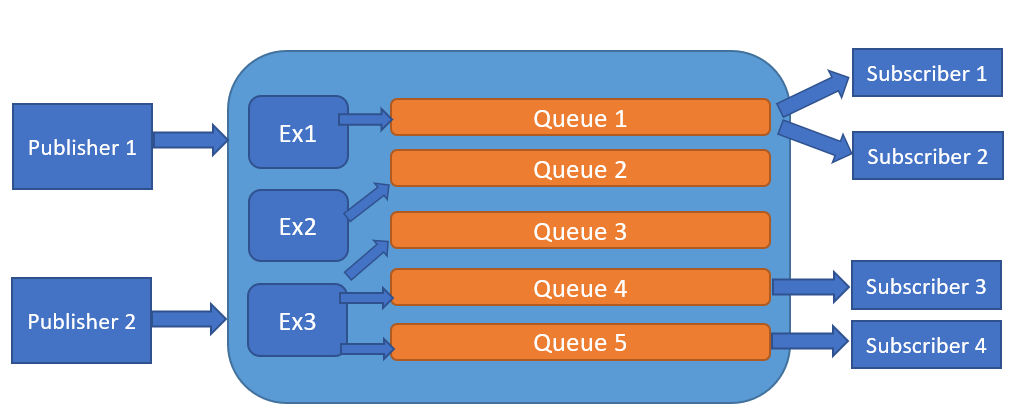
In this example, subscribers interact with queue only, they don't interact with exchanges.
Another thing to notice in this overview, you can have many subscribers related to one queue, in fact this is allowable, and behind the scenes, RabbitMQ balances incoming messages with all subscribers tune in, providing in fair way all messages.
What heppens if there's no subscribers tune in?, nothing.. messages remains in queues only for TTL specified on message attribute, or specified by client settings.
Notice messages always have a TTL in this library, this is a desire imposition in order to avoid eternal messages on queues.. It could be a huge mistake and could create strange behaviour on your RabbitMQ cluster (example, breakdown node due to insufficient disk space, new messages could have a high priority than the old ones).
Prepares subscribers
There are 3 kind of subscriber: CommonSubscriber, BinderSubscriber and RestHostSubscriber
CommonSubscriber
This is the simpliest subscriber client, which comunicates with its respective bound queue.
// define its own descriptor
var descriptor = new SubscriberDescriptor
{
    Address = new Uri("amqp://localhost:5672"),
    Credentials = new Credentials{ Username = "my-user", Password = "my-user-pwd" },
    PrefetchCount = 10,
    VirtualHost = "myhost",
    Queue = { Name = "demo" },
    RetryPolicy = { Enabled = true, MaxRetry = 3, Delayed = TimeSpan.FromSeconds(20) }
};

using (var subscriber = new CommonSubscriber<string>(descriptor, dataFormatter))
{
    subscriber.Received += (sender, args) =>
    {
        Console.WriteLine($"Message \t: {args.Message.Data}, created: {args.Message.Created}");
        Console.WriteLine($"Message properties: {JsonConvert.SerializeObject(args.Message.Properties)}");
    };
}
In the above example, subscriber uses its own descriptor which represents its settings, indicating queue, credentials, broker address ecc.
For more details about this descriptor object see here.
There are another two handlers present on Subscribers:
- OnException: used to intercept all exception during the reception of messages.
- OnMaxRetryFailed: used to intercept all exceptions when subscribers will reach the max number of retries.
About RetryPolicy property, this lets us to supply an extra logic to retry sending messages, in accordance with subscriber responses, so this logic is driven by subscribers, they're able to indicate if messages must be requeued, in that case messages will be re-delivered for "n" times indicated in the retry policy.
To know more about RetryPolicy policy see here.
BinderSubscriber
This client is similar to basic subscriber (CommonSubscriber), but it knows Exchanges which queue is bound on.
// define its own descriptor
var descriptor = new BinderSubscriberDescriptor
{
    Address = new Uri("amqp://localhost:5672"),
    Credentials = new Credentials { Username = "my-user", Password = "my-user-pwd" },
    PrefetchCount = 10,
    VirtualHost = "myhost",
    Queue = { Name = "demo" },
    Exchange = { Name = "demo-direct", Type = ExchangeTypes.Direct }
};

using (var subscriber = new BinderSubscriber<string>(descriptor, dataFormatter))
{
    subscriber.Received += (sender, args) =>
    {
        Console.WriteLine($"Message \t: {args.Message.Data}, created: {args.Message.Created}");
        Console.WriteLine($"Message properties: {JsonConvert.SerializeObject(args.Message.Properties)}");
    };
}
This client uses another derived descriptor named BinderSubscriberDescriptor, similar to base class (SubscriberDescriptor).
About these subscribers, as it can be realized, you need to add application handlers in order to intercept queue messages, so it's important to add them otherwise subscribers won't be able to received messages from its related queue which was bound on.
In the example, It was added only one handler, but you can add other ones as you want, and certainly you can remove them whenever It would be necessary.
Removing all handlers from subscriber unsubscribes it from its own queue, so subscriber won't be able to receive more messages.
RestHostSubscriber
RestHostSubscriber is a client designed to work with AspNetCore (2.*, 3.*), which implements a custom Application Host, able to interact with OWIN pipeline.
How does it work?, before starting with this tutorial, you need to install a nuget package which implements this subscriber, see ServiceBus.AspNetCore.Rabbit package.
This client incapsulates an application context (IHttpApplication<HostingApplication.Context>), this component is responsabile to forward and prepare http messages to send into Backend service (controllers for example), by OWIN mmidleware pipeline.
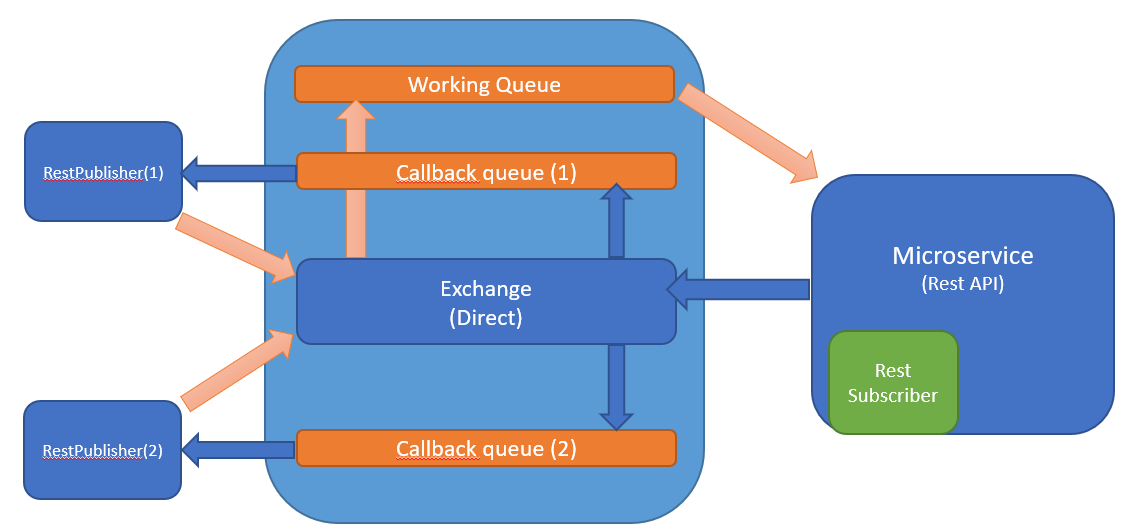
In the above overview, this client is hosted into Microservice API application as a plugin, the only thing to do is configuring this plugin in order to receive messsages from interested queue to be subscribed.
As mentioned before, Microservice API could subscribes to many queues using this client, but if your requirements is like this, you need to have many clients hosted as long as you need, because one client can only be subscribed in one queue.
In the following example, It shows how use this client on Web API Core project
Descriptor example
// defining | preparing a descriptor.
private RestHostDescriptor GetDescriptor()
{
  var desc = new RestHostDescriptor
  {
      Address = new Uri("amqp://localhost:5672"),
      Credentials = new Credentials{Username = "my-user", Password = "my-user-pwd" },
      Durable = true,
      PrefetchCount = 4,
      ServiceName = "my-api-demo"
  };
}
As you can notice, this descriptor derives from the same base class from publisher descriptors, but the new properties defined in this class are:
- Durable - Specify if all broker components are persistent on disk (Exchanges, Queues ecc)
- PrefetchCount - indicates the number of messages will be preloaded (in one shoot) by the current subscriber.
- ServiceName - this is a target that identifies your service, and It needs to be unique within your cluster / virtual host.
About PrefetchCount, this value lets you increasing the service throughput, but be carefull with this value, a high value could consume more resources on your API Rest due to parallelism tasks, if your intention is application scaling, It could be better to scale up your application, in combination with this parameter.
Regarding ServiceName property, this represents a simple identifier for your service, it could be named as you want, but the most important thing is this property is used even for other scopes, for creation queues and exchanges, using these prefixes:
- for queues - esb/queue
- for exchanges - esb/exchange
With the given prefix and service name, all rabbit components are created, so you don't need to define directly manually exchanges and queues, this is a responsability for this component.
IMemoryStreamResolver example
About this component, It's a dependency of this kind of subscriber, and it was defined in order to manage in an efficient way memory streams, opening or closing as application required, giving the possibility to customize some MemoryStream resolution.
Exists one default implementation for this contract called FuncMemoryStreamResolver, which can be used in these ways:
// the most simple way to use this contract,
private IMemoryStreamResolver GetStreamResolver()
{
  return new FuncMemoryStreamResolver(() => new MemoryStream(), bytes => new MemoryStream(bytes));
}
Another way...
// the most simple way to use this contract,
private IMemoryStreamResolver GetStreamResolver()
{
  var streamManager = new RecyclableMemoryStreamManager();
  return new FuncMemoryStreamResolver(() => streamManager.GetStream(), bytes => streamManager.GetStream(bytes));;
}
This last option, uses a recyclable memory stream, a custom implementation for MemoryStream class, which improves performance for buffering data, simplifying garbage collector task for deallocation arrays of bytes on memory heaps, see RecyclableMemoryStream documentation for details.
Startup example
// this is a portion of Startup.cs, when you configure all services usages (method Configure(...))
public void Configure(IApplicationBuilder app, IHostingEnvironment env, IApplicationLifetime appLifetime)
{
    if (env.IsDevelopment())
    {
        app.UseDeveloperExceptionPage();
    }

    app.UseForwardedHeaders();

    //Enable swagger
    app.UseSwagger();

    //Enable middleware to serve swagger-ui (HTML, JS, CSS, etc.), specifying the Swagger JSON endpoint.
    app.UseSwaggerUI(c =>
    {
        c.SwaggerEndpoint("v1/swagger.json", $"{ApplicationName} {ApplicationVersion}");
    });

    app.UseMvc();

    // in order to configure this client, you use this extension method.
    // you need to prepare these three dependencies
    RestHostDescriptor desc = GetDescriptor(); // gets your descriptor, maybe from appsettings.json
    IHttpRestMessageSerializer mexSer = GetMexSerializer(); //gets this service, maybe from dependency injection.
    IMemoryStreamResolver streamResolver = GetStreamResolver(); //even here, maybe from dependency injection.

    app.RunSubscriberHost(desc, mexSer, streamResolver);

    appLifetime.ApplicationStopping.Register(OnShutdown);
}
Notice each subscriber implements IDisposable, so It's needed to dispose once this client doesn't serve anymore, this is very important because this component is statefull, keeps a tcp connection with RabbitMQ, so this is an application responsability.
The above examples mustn't be considered an optimal way to configure your services.. naturally our recommendation is using your dependency injection engine, for descriptors surely is convenient to define them in asppsettings.json, so be free to configure all your services as you want.